Krita Overview
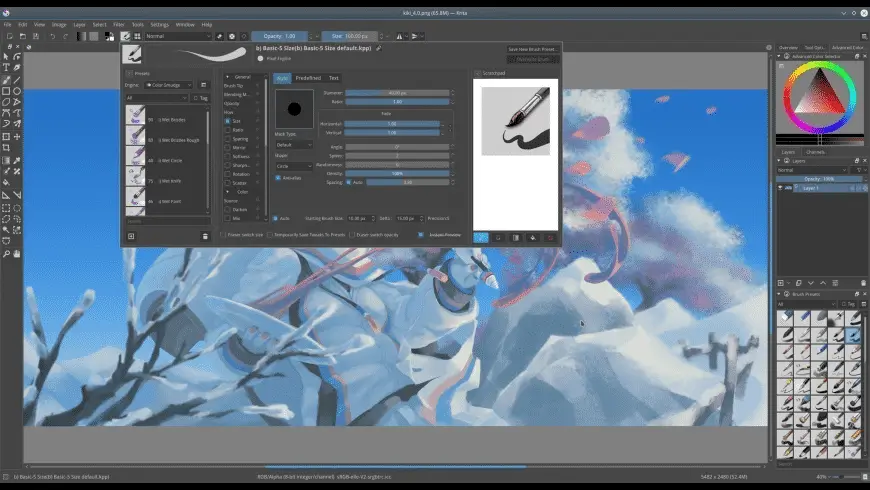
Krita for Mac is a free, open-source digital painting app built for concept artists, illustrators, and texture artists working in VFX. It includes nine distinct brush engines, each tuned for a different job, from color smudging to particle-based effects. Brush stabilizers smooth out shaky strokes using three different methods, plus a dedicated Dynamic Brush tool. A Pop-up Palette gives you quick access to color and brush choices with a single right-click. Wrap-around mode makes seamless texture and pattern painting straightforward. Krita is licensed under GNU GPL v3, so it stays free and open source permanently, though the project runs on donations to fund ongoing development.
Why Choose Krita for Mac
Most painting apps built for professionals come with a subscription. Krita doesn't. It's fully free under GNU GPL v3, with the same feature set whether you pay or not. The project survives on donations, not paywalls.
Its brush engine system goes deeper than most free alternatives. Nine separate engines, including Color Smudge, Shape, and Particle, each expose their own settings, so you're not stuck customizing one generic brush type. Wrap-around mode is a smaller but genuinely useful touch: press W while painting, and the canvas references itself along both axes, making seamless texture and pattern creation far less fiddly than manually offsetting an image to check the repeat.
Key Features
- Nine brush engines, including Color Smudge, Shape, Particle, and Filter engines
- Brush stabilizers with three smoothing methods, plus a Dynamic Brush tool
- Pop-up Palette for quick color and brush selection via right-click
- Wrap-around mode for seamless texture and pattern painting
- Resource Manager for importing and sharing brush and texture bundles
- Customizable dockers and panels, savable as your own workspace
- Animation tools for frame-based artwork
- PyKrita scripting support for automating tools and brush changes
- Drawing assistants for perspective and structured linework
- Active Krita-Artists community for sharing work and getting feedback
What's New in 5.3.3 Version
Krita 5.3.3 focuses on stability across selection, animation, and metadata handling. Recent changes include:
- Fixed layers getting deselected when starting a transform
- Fixed a crash when deleting a text shape
- Fixed FFmpeg 7.0+ compatibility for rendering HDR animations
- Corrected an out-of-bounds selection inversion issue
- Fixed XMP metadata not loading correctly on some files
- General crash fixes across selection and combined shape handling
- These updates are mostly targeted bug fixes rather than new features, aimed at making existing tools more reliable.
Supported macOS Versions
Krita requires macOS 10.15 or later and runs natively on both Intel and Apple Silicon Macs. Performance depends heavily on RAM. Krita needs at least 4GB, though the developers recommend 16GB for smoother work with large canvases or animation. A GPU supporting OpenGL 3.0 or higher is also required.
How to Install Krita on macOS?
Setting up Krita on your Mac takes just a few steps.
- Download the latest version of Krita for Mac.
- Open the downloaded disk image (.dmg) file.
- Drag the Krita icon into your Applications folder.
- Launch Krita from your Applications folder.
- Grant any permissions macOS requests on first launch.
- Once installed, you can create a new canvas and start painting right away.
How to Use Krita Mac?
- Open Krita and create a new document with your preferred canvas size.
- Choose a brush engine and adjust its settings in the brush editor.
- Enable a stabilizer if you want smoother strokes for detailed linework.
- Use the Pop-up Palette to switch colors and brushes without leaving the canvas.
- Save your custom workspace once your dockers and panels are arranged how you like.
- Export your finished piece, or import brush bundles through the Resource Manager.
Final Verdict
Krita packs a genuinely deep brush engine system into a completely free, open-source app, which is rare among painting tools built for professional illustration and concept art. Its stabilizers, wrap-around mode, and scripting support give it real depth beyond basic painting. Some users find the sheer number of settings overwhelming at first, and a handful report bugs or lag during heavier sessions, but for artists who want professional tools without a subscription, Krita remains one of the strongest free options on Mac.
Download Krita for Mac Latest Version
Ready to start painting without a subscription getting in the way?
Download Krita for Mac to access nine brush engines, stabilizers, wrap-around texture painting, and animation tools in one free app. Whether you're illustrating character concepts, painting textures for a VFX project, or just want a serious painting tool without ongoing costs, Krita gives you a professional-grade toolset backed by an active open-source community.